
1) Open http://resharper-plugins.jetbrains.com/packages in a browser;
2) Log in to a site;
3) Find a plugin e.g. http://resharper-plugins.jetbrains.com/packages/CitizenMatt.Xunit/ (pay attention, that there may be two versions of a plugin - one for R# 8.x and one for R# 9.x );
4) If you logged in, there will be a Download link;
5) Hit Download link and download the nuget package;
6) Put it to any folder;
7) Specify such folder here "ReSharper | Options | Environment | Extension Manager | Add" and uncheck ".NET Products Gallery" checkbox;
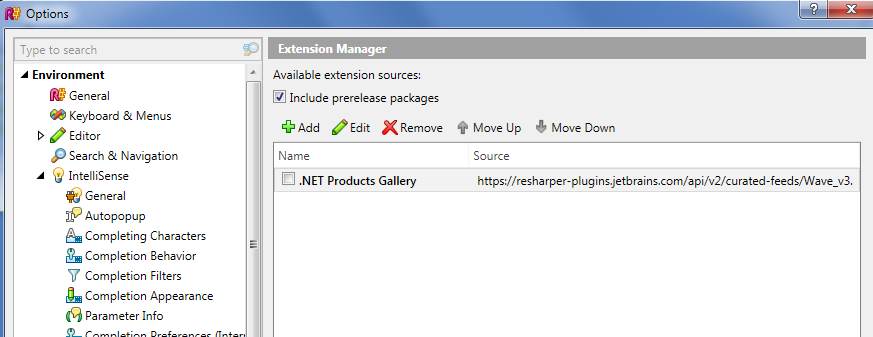
8) Run ReSharper | Extension Manager and install the plugin which appears there.
" and uncheck ".NET Products Gallery" checkbox"
I can't find this checkbox
The downloaded plugin files are zip files. Should they be unzipped before placing them in the local package folder?
@Jan I have never seen that downloaded plugins have .zip extension. It is usual .nupkg file (Nuget Package file).